One button. Your agency sells software.
Claude can now turn something it builds in the chat into a real app on a Mac or Windows computer. Here is how to build one for a client, hand it over, and charge for it every month.
- Mac and Windows
- Every Claude plan
- No code
- Still in beta
The short version
- Update the Claude app on your computer.
- Tell Claude what your client needs. It builds it right in the chat.
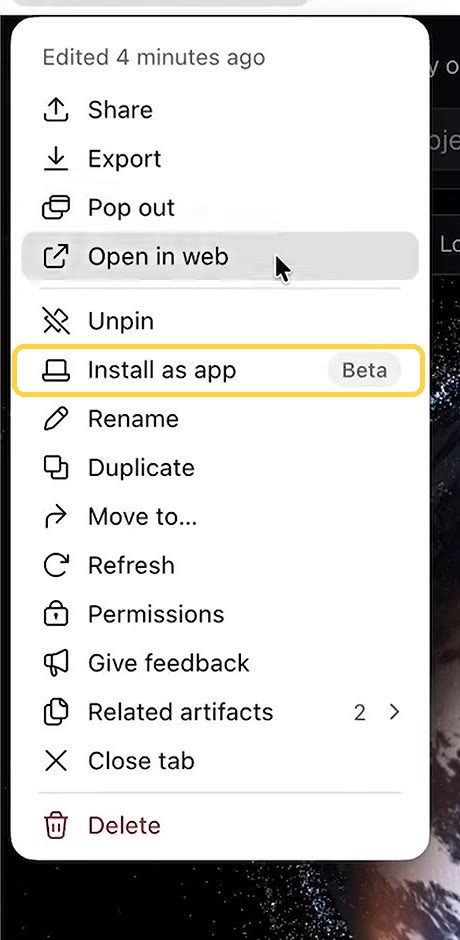
- Open the menu under the app's name and press Install as app.
- Share it with your client. Change it whenever they ask. Charge every month.
1. The three steps
You need the Claude app for Mac or Windows. Any plan works. The feature is new, so update the app first.
- Describe the app. Open a new chat and say what it is for, in plain words. Say who uses it, what it shows, where the numbers come from, and when it should tell them something. Section 2 has ten ready prompts.
- Try it in the chat. Claude builds it next to your message. Click around. Ask for changes the way you would ask a person: "make the text bigger", "add a status column", "put the client's name at the top".
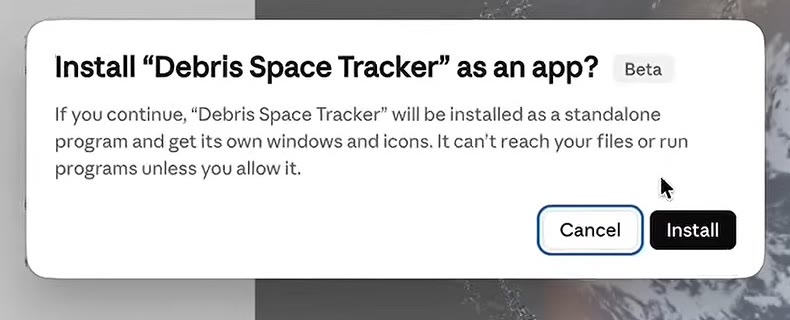
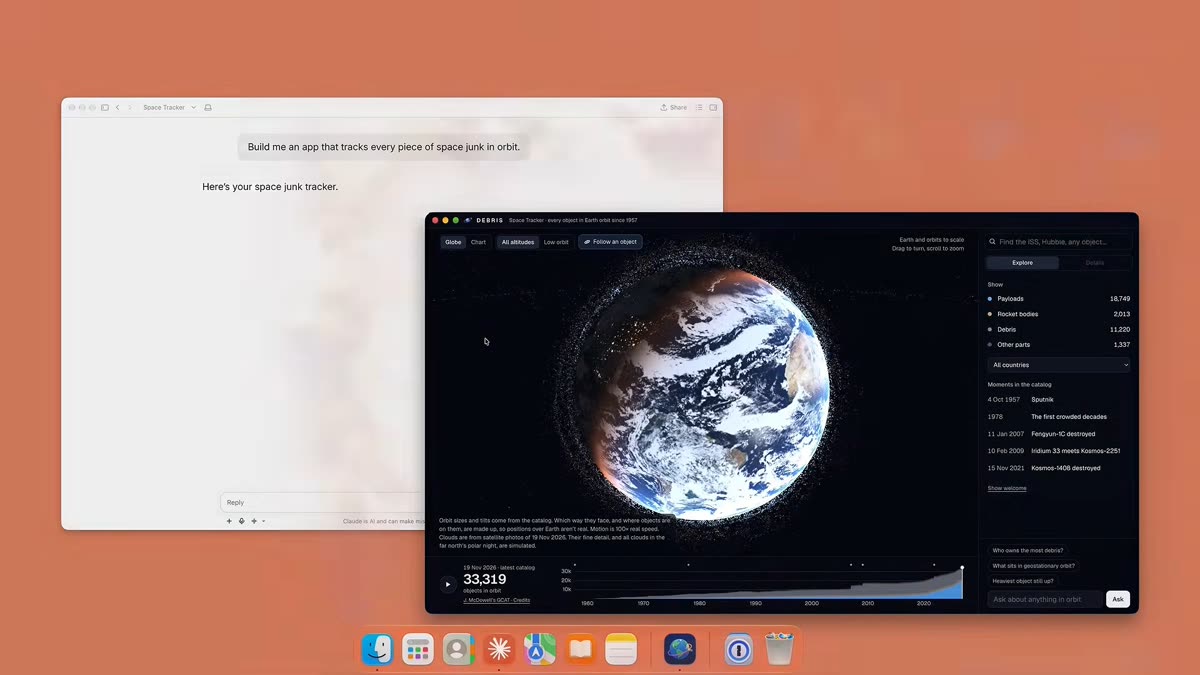
- Install it. Click the app's name at the top, then Install as app, then Install. It gets its own icon and its own window, outside Claude.
Five things to tell Claude
- Who uses it. "The front desk at a dental clinic." Claude builds for that person.
- What it shows. One screen. Name the three or four things on it.
- Where the information comes from. Their inbox, their calendar, a Google Sheet, or a file they drop in.
- When it should speak up. "Send a notification when a lead replies."
- How it should look. "One window, large text, their name at the top."
How to ask for changes
Type it the way you would say it. One change at a time works best.
The installed app picks up each change by itself. You don't install it again.
2. Ten apps you can build for clients
Each one is a small tool a client would open every day. Copy a prompt, change the parts in yellow, and paste it into Claude.
Lead tracker
Daily results
Ad spend watch
Content approvals
Review watch
Invoice reminders
Meeting prep
Inbox sorter
Ship today
Follow-up nudge
3. Hand it to your client
- Put their name on it. Ask Claude: "Name it [CLIENT NAME] Lead Tracker and put their name at the top." It should feel like theirs.
- Share it. Use Share in the same menu and send it to your client.
- Tell them what they need. The Claude app on their Mac or Windows computer, and a Claude account. Any plan works, even the free one. They have to be online and signed in to open it.
- Walk them through the first open. Claude asks what the app may do. Stay on a call for two minutes the first time.
What to say on the first call
Two minutes, screen shared. The exact buttons can differ while the feature is in beta.
What Claude asks permission for
- Normal. What a web page can do. Fine for most small apps.
- App permissions. Notifications, staying on top of other windows, keyboard shortcuts. Needed for an app that tells them when a lead replies.
- Full computer access. Running programs and changing files without asking. Claude only offers this for apps you made yourself, so your client's copy should not need it.
4. Charge every month
You are not selling a file. You are selling a tool that keeps getting better. That is why it can be monthly.
- A setup fee for building the first version.
- A monthly fee for changes and for keeping it working.
What the monthly fee covers
- Changes when they ask. You edit it in Claude and their app updates by itself. No reinstalling.
- New screens. A new report, a new column, a new alert.
- A check each month that it still opens and still shows the right numbers.
Three ways to price it
- Per app. One fee to build it, one fee each month to keep changing it.
- As a bundle. Three small apps for one monthly fee.
- Inside your retainer. The app comes with your service. It becomes a reason they stay.
Agree on three things up front
- How many changes a month are included.
- How fast you make them.
- What happens if the feature changes. It is in beta. Say so in writing.
5. The pitch
Build it first. Then send four short lines. A client says yes faster to something that already exists.
- One thing it does. Not a list of features.
- End on a small ask. "Can I send it over?" is an easy yes.
- No price in the first message. Let them try it first.
Who to offer it to first
- A client you already work with. They trust you, and you know their day.
- The one who asks for the same report every week. Build that report as an app.
- Build it with their real name on it before you mention it. Then show it on your next call.
Good to know
- It is in beta. Things can change, and not everyone has it yet.
- Mac and Windows computers, through the Claude app.
- Online and signed in. The app will not open without Claude.
- Usage counts. What the app asks Claude counts toward the plan of the person using it.
- Not everything installs. Claude's Docs, Slides and Sheets can't be installed as apps.
- Work accounts. On a Team plan it is on, with full computer access off. On Enterprise an owner has to turn it on.
- Nobody checks these apps for you. Anthropic does not review them. Only install apps from people you trust. For your client, that person is you.
Quick answers
- Does my client need a paid Claude plan?
- No. Any plan works, the free one too. What the app asks Claude counts toward their plan's limits.
- Does it work without internet?
- No. They have to be online and signed in to Claude.
- Do they install it again after I change it?
- No. It updates by itself. Claude asks them for permission again.
- Can I give it to someone who has never used Claude?
- Yes, but they install the Claude app and sign in first.
- I can't find the button.
- Update the Claude app. On a work account, ask whoever manages it to turn the feature on.